
Features
Everything a WhatsApp sales team needs. Nothing it doesn’t.
One number, a shared inbox, automation that follows up, broadcasts that get through, and a pipeline that ends in a payment.
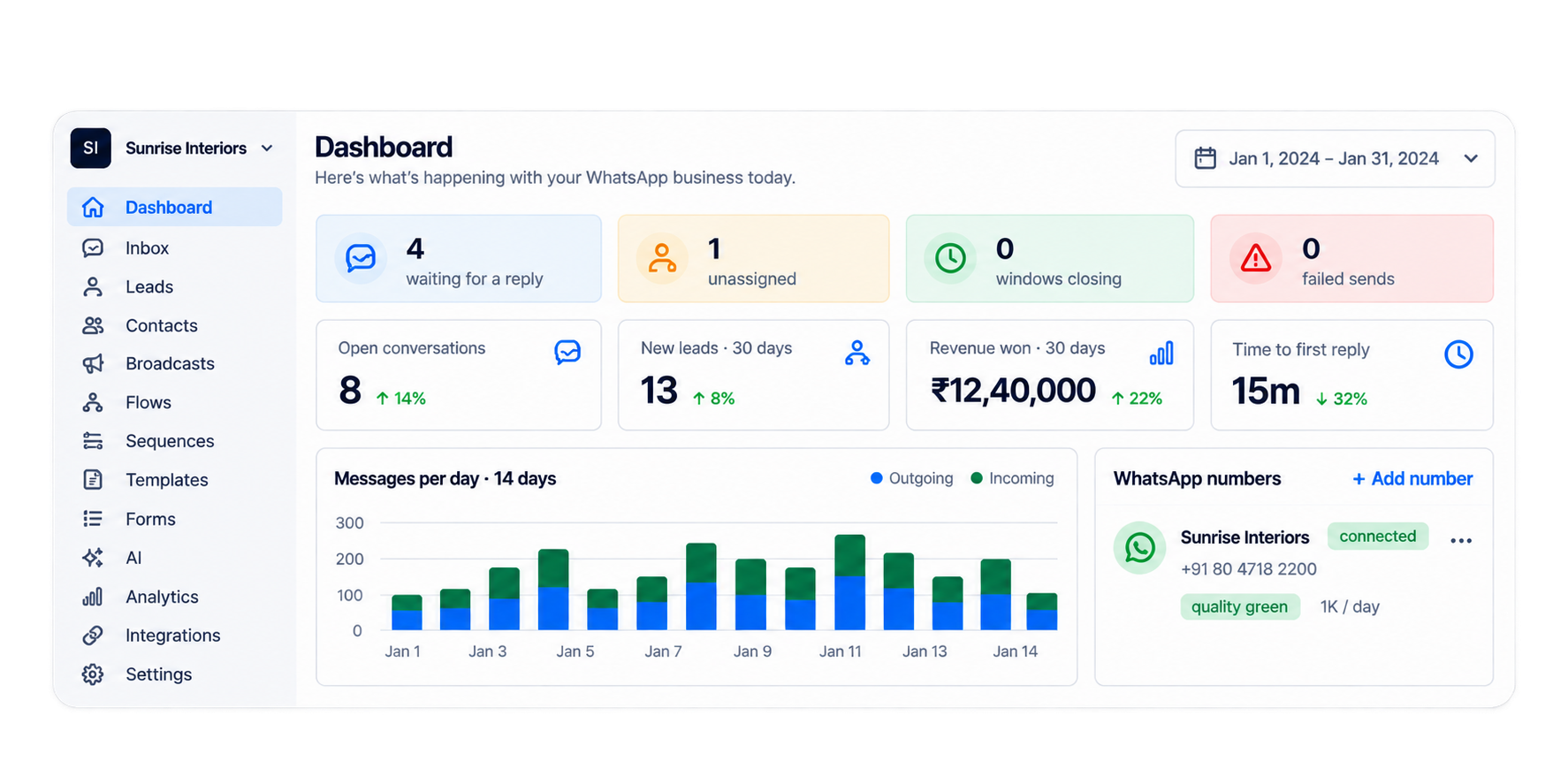
At a glance
Seven things. One place.
Team inbox
One number, whole team, nothing unanswered
Jump toAutomation
Flows, sequences and AI replies
Jump toBroadcasts & templates
Approved templates to people who said yes
Jump toLeads & payments
A pipeline from chats, paid in the chat
Jump toWhatsApp Forms
Collect details without leaving WhatsApp
Jump toIntegrations & API
Razorpay, webhooks, REST API
Jump toAnalytics & security
Funnels, attribution, DPDP-ready
Jump to
Team inbox
One number.
Your whole team.
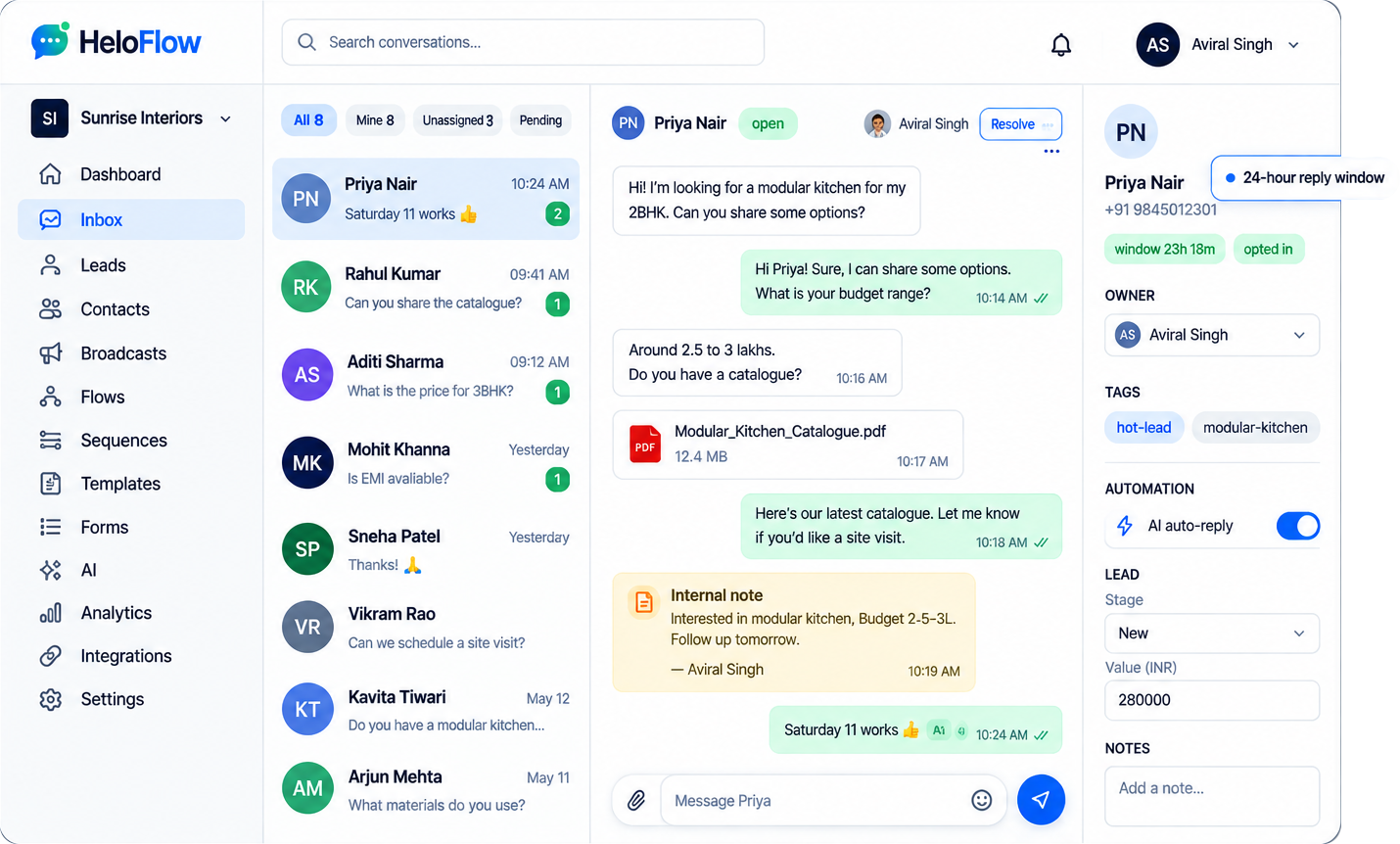
Every WhatsApp conversation in one place, owned by one person, with nothing sitting unanswered.
Assign, don't forward
One owner per chat, so two people never reply to the same customer.
The 24-hour window, on screen
A live countdown on every chat, so nobody gets stuck unable to reply.
Canned replies and private notes
Type a shortcut to answer, leave notes the customer never sees.
Nothing slips
Unread, unassigned and failed sends all surface at the top.
Automation · Flows
Build the conversation once.
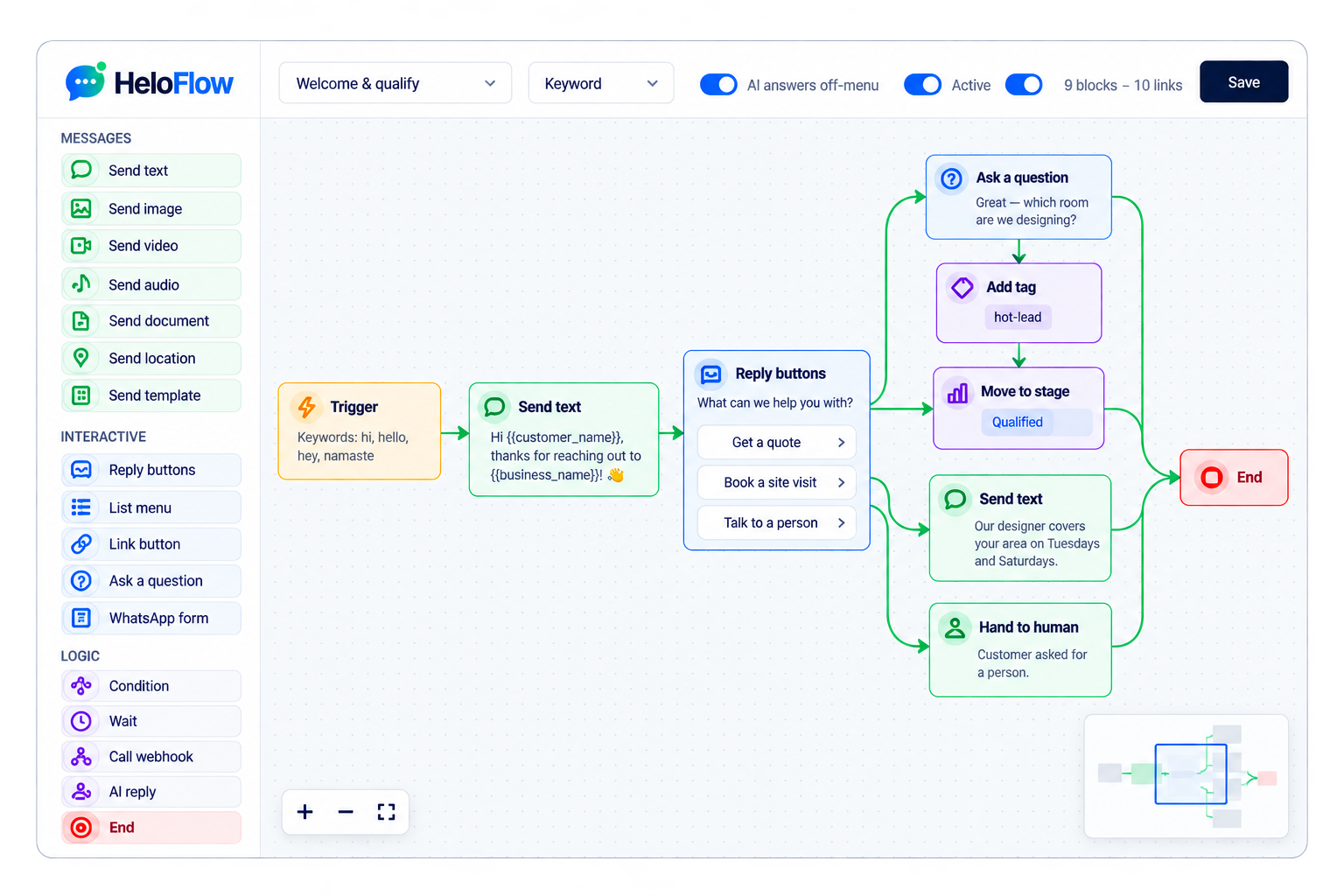
Drag blocks onto a canvas. The flow replies the moment a message lands, day or night.
Twelve kinds of block
Text, image, document, template, reply buttons, list menu, WhatsApp form, condition, wait, webhook, AI reply, hand to human.
Starts on a keyword or a first message
Match exact words, contains, starts-with or a pattern.
Tags and stages set themselves
A flow can tag the contact and move the lead as it goes.
Test it before it goes live
A test panel in the builder plays the conversation back.
Automation · Sequences and AI
Follow-ups on day seven. Answers at 2am.
Two things that run without anyone remembering to.
No-reply follow-up
activewhen no reply for 24h
After 1 day
Send the ‘follow_up_still_interested’ template
After 4 days
Send ‘Still happy to help whenever you’re ready — just reply here.’
After 11 days
Move the lead to Lost
Stops as soon as the customer replies.
Sequences
Timed steps over days
Each step waits, then sends a message or changes the lead.
Stops the moment they reply
The rest is cancelled when the customer answers.
Starts on silence, a stage, or a tag
Enrol by rule or by hand.
AI auto-reply
When on, unanswered customer messages get a reply drawn from your knowledge base. It never speaks over a human.
Languages
- English
- Hindi
- Marathi
- Gujarati
- Tamil
- Telugu
Confidence threshold (0.62)
Use your own documents, FAQs and website content.
AI replies
Answers from your own knowledge
Upload documents or paste text; it quotes from those, not the internet.
Never speaks over a human
Three switches keep it quiet, including a ten-minute pause the moment a person replies.
Every decision is logged
Including the ones where it chose to stay silent, and why.
Broadcasts & templates
Reach everyone
who said yes.
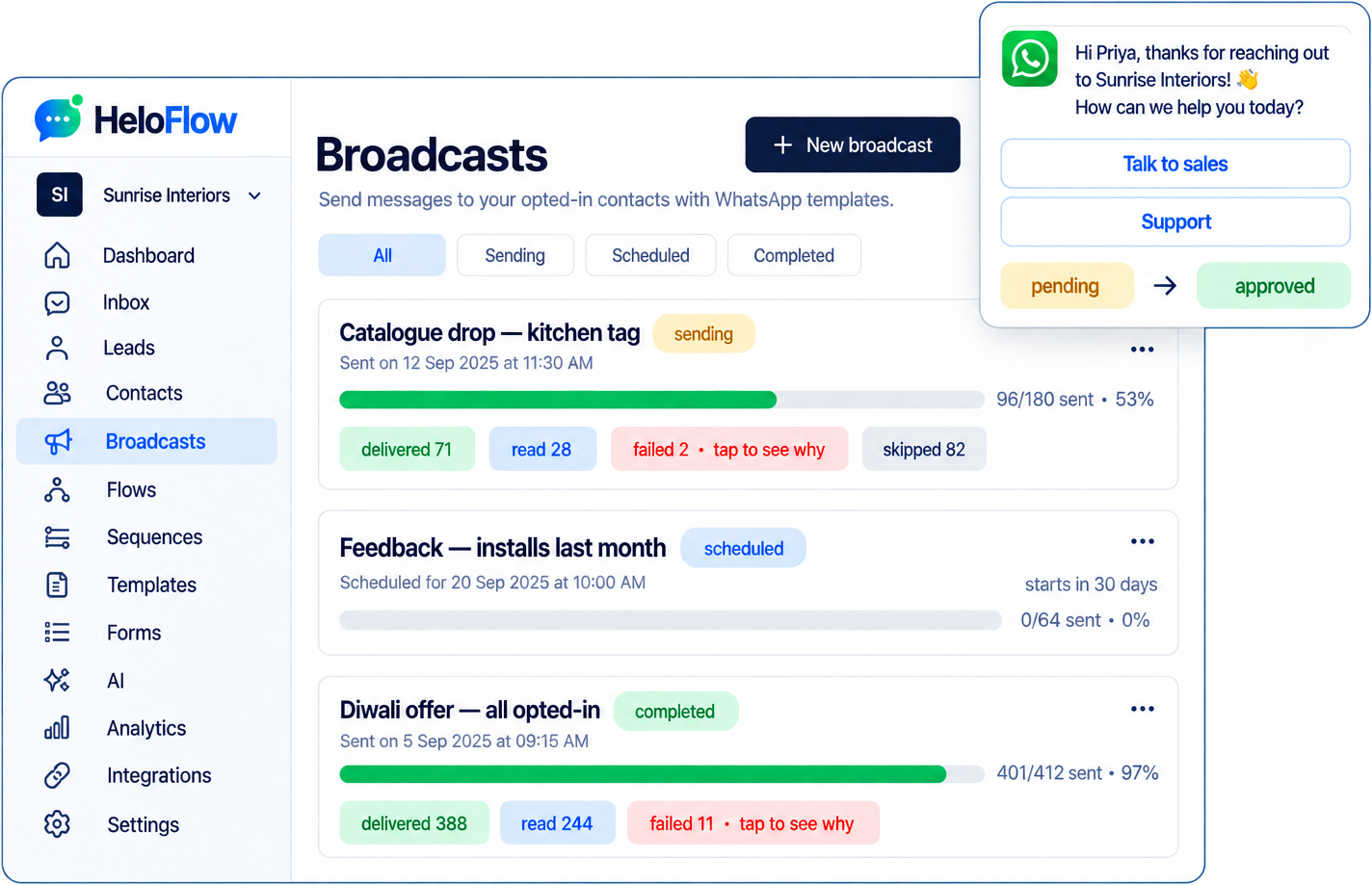
Meta-approved templates, sent only to people who opted in, with every delivery and read counted.
Templates approved without leaving the page
Build it, submit it to Meta, and watch it move from pending to approved.
Opt-in is enforced, not assumed
Anyone who has not said yes is skipped automatically — and you can see how many.
Numbers you can act on
Sent, delivered, read and failed. Failed tells you why.
Sent within your number's limit
Batched to Meta's tier for your number, so a big send never gets it restricted.
Leads & payments
Every enquiry becomes a lead. Every lead can pay.
A pipeline built out of your chats, and a payment link that lands right inside the conversation.
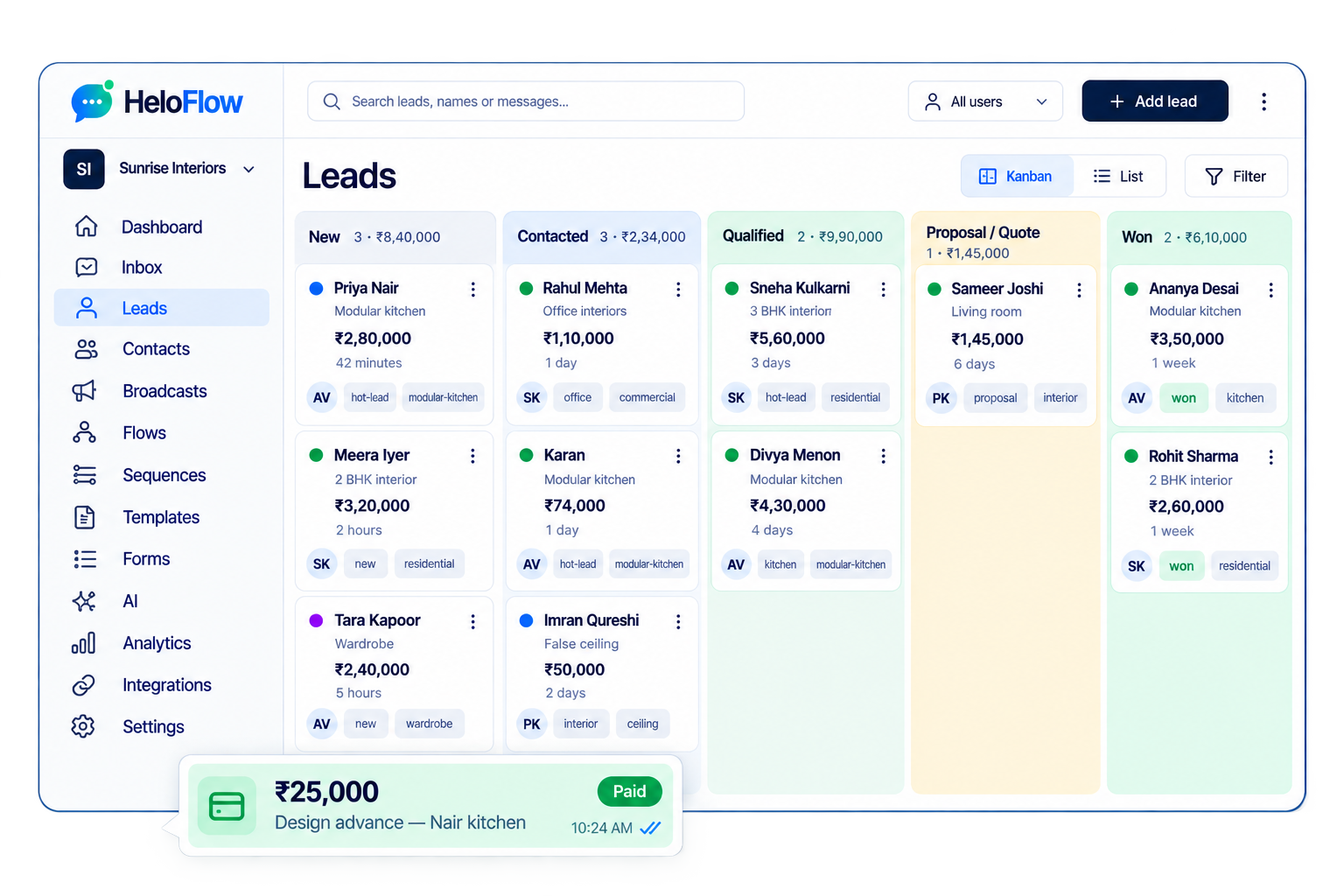
Leads open themselves
A new enquiry creates a lead with an owner and a stage — nobody types it in.
A pipeline you can drag
New, contacted, qualified, proposal, won. Move the card and the chat knows.
Forms inside WhatsApp
Collect details in a native WhatsApp form; the answers land on the lead.
Get paid in the chat
Send a Razorpay link and watch it settle. Your own account, no cut taken.
WhatsApp Forms
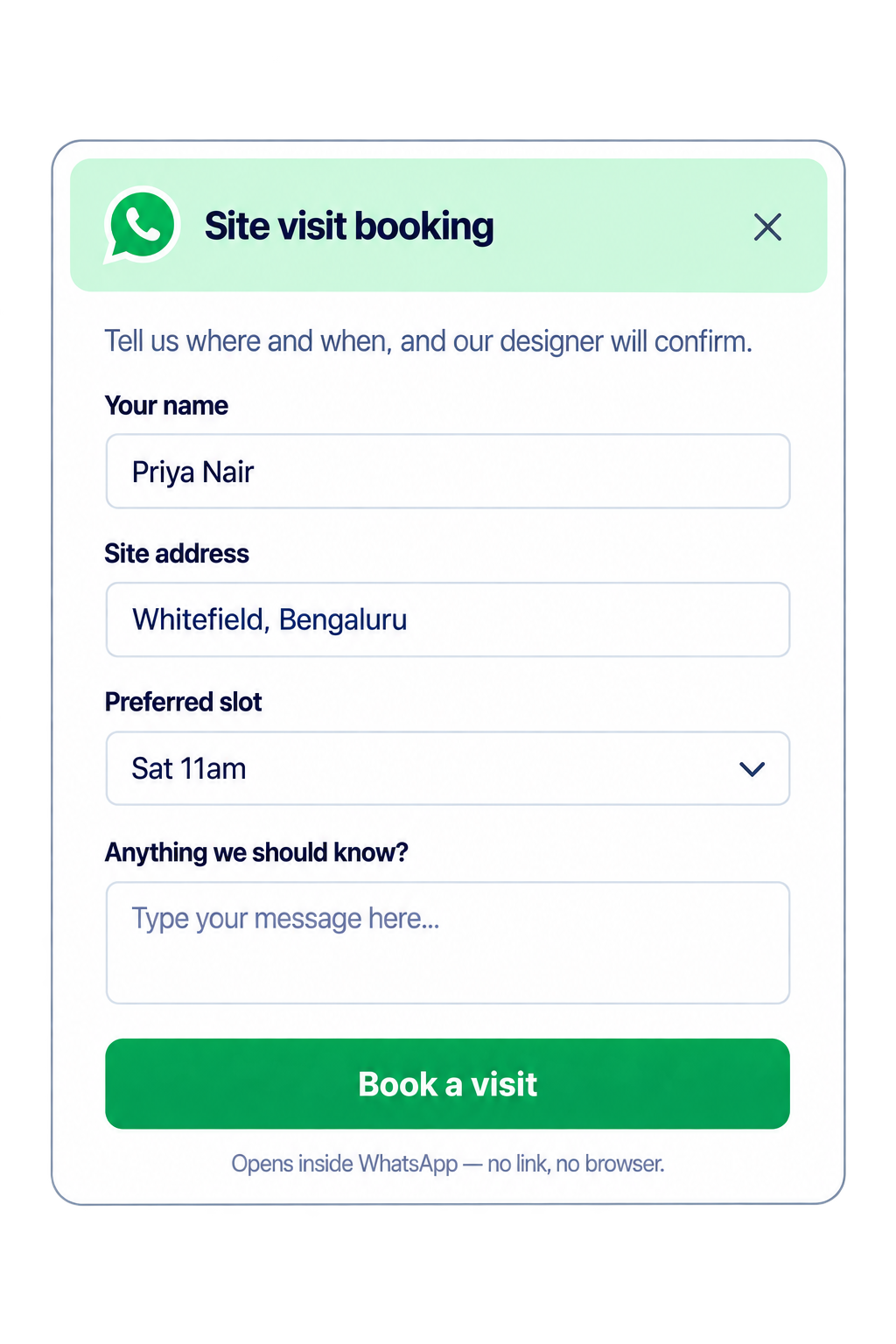
Collect details without leaving the chat.
A native WhatsApp form opens inside the conversation. The answers land on the lead.
Native, not a web link
Built on Meta's Flows, so it opens inside WhatsApp with no browser and no drop-off.
Any fields you need
Short text, long text, number, email, phone, choice list, date.
Answers land on the lead
Every submission is attached to the contact and the lead, ready to act on.
Send it from a flow or by hand
Publish once through Meta, then use it anywhere.
Integrations & API
Fits the tools you already run.
Connect payments, push every event where you need it, or build on the API.
Razorpay
Payment links from the chat, settled straight to your own account.
Webhooks
New lead, new message, payment paid — pushed to your URL as it happens.
REST API
Scoped keys. Create leads, send templates, read conversations.
Event automations
When this happens, do that: tag, assign, notify, call a webhook.
Broadcasts & campaigns
Reach thousands of opted-in customers with a message that actually gets read. Templates go through Meta approval inside HeloFlow, so you find out about a rejection before the campaign, not during it.
Template builder
Write, preview and submit templates, and watch their Meta approval status in one place.
Audience segments and tags
Build audiences from tags, order history, last reply or any custom field you sync in.
Scheduling and time-zone send
Schedule a campaign once and have it land at a sensible local hour for each contact.
A/B test message variants
Send two versions to a slice of the audience and roll the winner out to the rest.
Retry on failure
Temporary delivery failures retry automatically instead of quietly disappearing.
Campaign analytics
Sent, delivered, read, replied and opted out, per campaign and per segment.
Chatbots & flows
Build the conversation once and let it run. Flows qualify leads, take bookings and answer the questions your team types out twenty times a day — then hand over cleanly when a person is needed.
Visual flow builder
Drag steps onto a canvas and see the whole conversation, no code anywhere.
Buttons, lists and quick replies
Use WhatsApp's own interactive message types so replies are taps, not typing.
Conditions and variables
Branch on anything the customer said, or on data you already hold about them.
WhatsApp Forms
Collect structured answers inside the chat with native WhatsApp Flows.
Keyword and intent triggers
Start a flow from a keyword, an ad click, a webhook or what the person meant.
Hand-off to human
Route to the right agent at the right moment, with the whole thread attached.
Northline Clinic
Business account · online
I'd like to book a consultation.
Book a consultation
Fill this in without leaving the chat and I will confirm your slot.
Name
Preferred date
Service
AI replies
An assistant trained on your own material, not the open internet. It answers from your catalog, policies and FAQs, and it says so when it does not know.
Train on documents and website
Point it at your site and upload PDFs or sheets; it reads them in minutes.
Confidence-based hand-off
Below your confidence threshold it stops guessing and fetches a person.
Multilingual
Answers in the language the customer wrote in, including regional languages.
Detail pending founder confirmationTone and guardrail settings
Set how formal it sounds and what it must never discuss, such as discounts.
Review and correct
Fix an answer once and that correction is what it says from then on.
Conversation summaries
Agents picking up a thread get a two-line summary instead of a wall of text.
Team inbox
One business number that a whole team can work from, with the accountability of a proper helpdesk and none of the ticket jargon your customers would find strange.
Agents per plan
Seat limits per plan are being finalised; ask us about your team size.
Detail pending founder confirmationAssignment and round-robin
Assign by hand or distribute new conversations evenly across who is online.
Internal notes and mentions
Talk to your team inside the thread. The customer never sees a word of it.
Canned replies
Save the answers you send constantly and drop them in with two keystrokes.
SLAs and reminders
Flag conversations that have gone quiet before the customer notices.
Mobile app
A companion mobile app is on the roadmap; the web inbox works on phones today.
Detail pending founder confirmation
Commerce & payments
Sell and get paid without sending anyone to a different app. Products, carts, payment requests and order updates all live in the same thread the customer started.
Catalog sync
Keep products, prices and stock in step with the store you already run.
Product cards and carousels
Show images, prices and buttons customers can act on straight away.
Cart and order messages
Carts, confirmations and order summaries formatted for WhatsApp, not email.
Payment links
UPI and cards today; the full gateway list is still being confirmed.
Detail pending founder confirmationOrder status notifications
Packed, shipped, out for delivery and delivered, triggered from your systems.
Abandoned-cart recovery
One well-timed nudge on the channel people actually open.
Third Wave Coffee Co.
Business account · online
Show me your bestsellers
Cold brew concentrate — 500ml
₹649 · Free delivery
Our most reordered product. Swipe for two more.
Or pick a category to browse.
- Coffee
- Brewing kit
- Gifting
Integrations & API
Connect the tools you already run, or build your own. Everything the dashboard does is available over the API, so nothing is locked behind our interface.
Native integrations
Shopify, WooCommerce, HubSpot, Zoho, Razorpay and more on the integrations page.
Webhooks
Get a POST the moment a message arrives, a flow completes or a payment lands.
REST API
Send templates, read conversations and manage contacts from your own code.
Zapier and Make
Wire WhatsApp into a few thousand other apps without writing anything.
Google Sheets
Push leads into a sheet, or drive a campaign audience from one.
Custom builds
PureFlow Studios can build the integration your stack needs if it is missing.
curl -X POST https://api.heloflow.com/v1/messages \
  -H "Authorization: Bearer $HELOFLOW_API_KEY" \
  -H "Content-Type: application/json" \
  -d '{
    "to": "+919876543210",
    "type": "template",
    "template": {
      "name": "order_shipped",
      "language": "en",
      "variables": { "1": "Asha", "2": "HF-1042" }
    }
  }'
Analytics & compliance
Know what the channel is worth and stay on the right side of WhatsApp's rules. Opt-in records, quality monitoring and an audit trail are part of the product, not an afterthought.
Delivery, read and reply funnels
See where a campaign loses people, not just how many messages left the building.
Revenue attribution
Tie orders and payments back to the campaign or flow that started the conversation.
Agent reports
Response times, resolution and volume per agent, per day or per shift.
Opt-in management
Every contact carries a record of how and when they opted in, and opt-outs are honoured.
Quality-rating monitoring
Watch your WhatsApp quality rating and messaging limits before they bite.
Audit log and data residency
Who did what, and where your data is stored. Residency options are being confirmed.
Detail pending founder confirmation
Start confirming conversations today
Connect your WhatsApp Business number, add your content and go live — free to start, no credit card.
Questions first? Read the FAQ